TraderMatrixAutoRefresh
Browser extension for TraderMatrix that rotates and refreshes your tab group automatically.
What it does
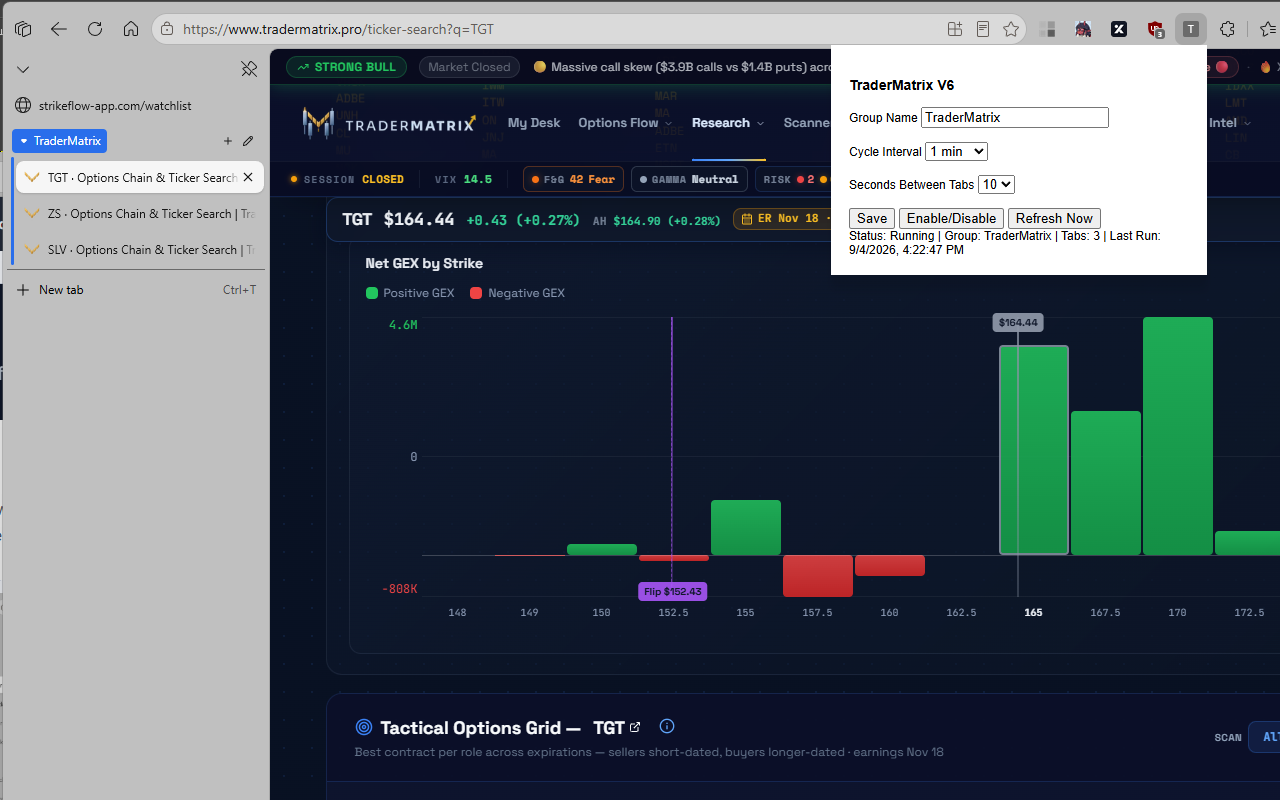
TraderMatrixAutoRefresh is designed for TraderMatrix users who monitor multiple option-chain or ticker pages. It cycles tabs in your selected group on a schedule, refreshes each tab with a configurable delay, and provides quick controls to save settings, pause/resume, or force an immediate refresh.
Download
Download TraderMatrixAutoRefresh_V6.zipAfter download, extract the ZIP to a folder before loading it into your browser.
Install in Microsoft Edge
- Download TraderMatrixAutoRefresh_V6.zip and extract it to a permanent folder.
- Open Edge and go to edge://extensions.
- Turn on Developer mode (bottom-left panel).
- Select Load unpacked.
- Choose the extracted folder that contains manifest.json.
- Pin the extension, open TraderMatrix tabs, then configure Group Name, Cycle Interval, and Seconds Between Tabs.
Install in Google Chrome
- Download TraderMatrixAutoRefresh_V6.zip and extract it to a permanent folder.
- Open Chrome and go to chrome://extensions.
- Enable Developer mode (top-right).
- Click Load unpacked.
- Select the extracted folder that contains manifest.json.
- Pin the extension and start it from the toolbar popup after opening your TraderMatrix tab group.
Quick start
- Set Group Name to the tab-group label you use in TraderMatrix (for example, TraderMatrix).
- Pick a Cycle Interval and Seconds Between Tabs.
- Click Save, then use Enable/Disable to start or stop rotation.
- Use Refresh Now any time you want an instant manual cycle.